 The Museum of HP Calculators
The Museum of HP Calculators
This note also applies to many AOL users since most versions of AOL explorer are based on Internet Explorer.
In some cases, Internet Explorer (especially IE6) is installed with the TLS secure transport disabled which generates a "The page cannot be displayed" message when you try to access some secure pages.
To remedy this, click on the Tools menu in IE and then Internet Options. Click on the Advanced tab. Scroll down to the bottom and make sure "Use TLS 1.0" is checked.
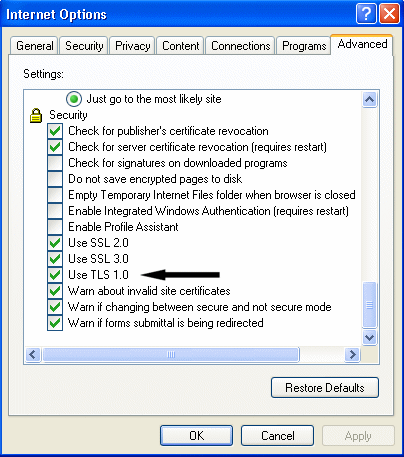
TLS is the latest version of the Secure Sockets Layer and is sometimes called SSL 3.1. Some older servers are "TLS intolerant". Some newer servers only want to use the newer standard. Browsers and servers should be able to roll back to an older protocol automatically but sometimes miscommunications between the browser and server or a proxy in between them prevents this from happening. Unfortunately, until all servers are updated for TLS support, you may have to occasionally turn this option on and off depending on which secure sites you visit.
 Go back to CD description page