 The Museum of HP Calculators
HP Battery Information
Warning!
The information contained here was obtained by a combination of measurements
and printed data and is subject to error. It should be considered preliminary
and subject to change. Incorrect voltage or polarity can damage
a calculator. If you find any errors, please
contact Dave Hicks. Chargers are either 120V
or 120/240V switchable unless otherwise noted. Information on 240V only chargers
is needed!
This information is supplied without representation or warranty of any kind.
The Museum of HP Calculators does not assume any responsibility and shall
have no liability, consequential or otherwise, of any kind arising from the
use of this information.
Please be careful cutting old packs apart and working with leaking batteries.
Warning! Most models can be damaged if run from
the charger without good batteries installed.
Only the manuals for the HP 35 and 45 models say that it's OK to run without
batteries, but many collectors feel that even those should have batteries
installed for maximum protection and long life.
General NiCd tips
-
Don't leave NiCd batteries constantly charging. This overcharging leads to
voltage depression which is the most common cause of what is generally called
"memory effect". (True "memory effect" rarely occurs in consumer devices
because it requires many cycles to precisely the same states of charge and
discharge.)
-
Don't completely discharge packs every time to avoid "memory effect".
Discharging a pack too far can cause the stronger cell(s) to charge
the weakest cell in the opposite direction. This is called reverse charging
and will lead to a very early death of the pack. However, through normal
use, it's fine to occasionally run the calculator to the point where it indicates
a low battery.
-
NiCds that are weak due to overcharging can sometimes be rejuvenated by a
full charge/deep discharge cycle. Unfortunately, the only way to assure that
reverse charging doesn't occur is to discharge each cell separately.
-
NiCds are easily damaged by heat so if you need to solder leads to them,
use batteries manufactured with solder tabs. Be quick with the soldering
iron and wear eye protection in case of a rupture.
-
Even with proper use, NiCds do eventually wear out.
-
Some apparent battery problems are really caused by surface corrosion on
battery or charger contacts. A knife or fine sand paper can sometimes work
wonders. Be careful not to sand/scrape through the plating! Work very gently.
-
Some people have replaced NiCds with standard alkaline batteries. These may
work but are not exactly the right voltage so there could be damage on old
calculators. If you attempt this, make sure to get the polarity correct.
Do not attempt to charge alkaline cells.
-
Some people have replaced NiCds with NiMH cells, however the older HP charging
systems were not designed for NiMH cells so you need to
use a different charger or modify the HP charger. This is not recommended
unless you are sure of what you are doing. Replacing standard NiCds AAs with
higher capacity newer NiCD versions usually works.
-
Please also see
Katie
Wasserman's article.
Classics (HP-35, 45, 55, 65, 67, 80)
-
Battery HP 82001A/B
-
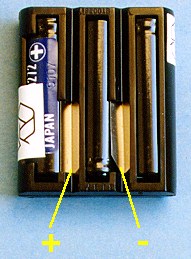
The Classic battery pack consists of 3 tabbed AA NiCd batteries providing
3.75 volts. The battery case can be carefully cut along the seam
and glued closed to install fresh batteries.
 Picture of a classic battery pack with polarity marked
(~20K)
Picture of a classic battery pack with polarity marked
(~20K)
Picture of a classic battery compartment with polarity marked
(~22K)
-
Chargers HP 00035-60008, HP 03502A, HP 82001B, HP82002A/B/C, HP 82010A (120/240V)
HP 82022A (240V), HP 82011A (240V)
-
Output 3.6-4.7 V DC @ 150-190MA calculator, and 4.2 V DC @ 50-60 MA battery
charger. (Exact specs vary slightly with charger model but chargers are
interchangeable.) A complete recharge takes 14 hours with the calculator
on or off. The batteries are low when extra decimal points are displayed.
     +-----------+
     | o   -   o |
     | +   o     |
     +-----------+
Looking at the plug, the center terminal is marked negative. The left terminal
is marked + and charges the batteries and the right unmarked terminal (also
positive) supplies operating power. (The battery charger circuit is current
limited and will typically read much higher than 4.2 V without a load.) When
the power plug is removed, a spring connects the left and right terminals
allowing the batteries to power the calculator.
Sometimes, classic batteries seem to be dead because surface corrosion
has built up in the springy piece that connects two of the charging posts
when the charger cable is removed. Try cleaning them with a pocketknife or
fine sandpaper but be very gentle and careful so you don't sand/scrape through
the plating.

Bob Marinelli reports:
"I Discovered a very common & cheap Panasonic portable phone replacement
battery pack:
Panasonic HHR-P505, KX-TCA14, 3.6V 1300mAh
They are NiMH, exactly the right size to fit in an HP 35,
65, etc. and even better, they come with nice Red and Black wires about 4
inches long. Just connect the wires! This battery, once charged, seems to
run forever & not lose power."
Another choice is Gold Peak Batteries (available in the UK from CPC tel 01772
654455 and distributed worldwide.) The T110 has three NiCd batteries which
are wire terminated. The T160 is similar but contains NiMH cells. The T109
is like the T110 but has tabs instead of wires. (This information is from
Tim Steele.)
Woodstocks (HP-21, 22, 25, 25C, 27, 29C)
-
Battery HP 82019B
-
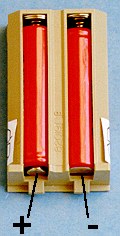
The Woodstock battery pack consists of 2 AA NiCd batteries providing 2.5
volts. Because the battery pack is also the battery door, it is difficult
to produce a suitable replacement. The easiest path is to find an old pack,
cut through the center plastic strip between the two batteries and slide
new cells in. (Cutting at the terminal end seems to work best.) Alternately,
you may want to separate the two halves of the pack at the seam by prying
with a knife. This may be a little more work but the pack can be reassembled
with less signs of tampering. Many 20 series calculators have been damaged
by replacing batteries with the polarity reversed so be careful.
Picture of a Woodstock battery pack with polarity marked
(~11K)
Picture of a Woodstock battery compartment with polarity marked
(~22K)
-
Chargers HP 82024A (120/240VAC), HP 82026A, HP 82041A/B/C, HP 82025A (230VAC)
-
Output 10 V AC, 1.8 VA Max. A complete recharge takes 17 hours with the
calculator on or 6-10 with the calculator off. The batteries are low when
extra decimal points are displayed or the decimal flashes.
Sting (HP-10 and HP-19C)
-
Battery HP 82052A
-
The Sting battery pack consists of 4 AA NiCd batteries providing 5 volts.
The polarity keying is somewhat subtle. The pack can only be installed such
that the terminal holes are near the top side (with the calculator held face
down.) There appear to be 4 terminals but only the outer terminals provide
power. The center posts in the battery compartment serve to label the outer
posts! The key depressions in the top of the pack allow the door to be installed
after the battery is inserted.
Picture of a Sting battery pack with polarity marked
(~14K)
Picture of a Sting battery compartment with polarity marked
(~22K)
-
Charger 82059A/B (82066A/B, 82068B 230VAC)
-
Output 8 V AC, 3 VA max. A complete recharge takes 17 hours with the calculator
on or 6-9 with the calculator off. The batteries are low when extra decimal
points are displayed or the decimal flashes.
Coconut (HP-41C, CV and CX)
-
Optional Rechargeable Battery HP 82120A
-
The Coconuts came with a holder for 4 N size alkaline batteries. The rechargeable
pack was an option. The SANYO N-75P cells in the rechargeable pack are have
been discontinued and are very difficult to find. The closest equivalent
is the 1/3AAA NiCDs such as the Sanyo 1/3AAA-50WT. These have also been
discontinued but may be easier to find. Some possible sources:
http://www.tnrtechnical.com,
http://www.dantona.com, and
http://nicdlady.com. NiMH cells in this
size are still available, however the original HP charging circuit
was NOT designed to charge NiMH cells. You may be able to use them
with a different or modified charging system.
The cells are welded and there is little room for any other approach.
Professional help such as Batteries
Plus is inexpensive and recommended. The easiest way to revive an old HP-41C
is to buy N cells for the standard holder.
-
Charger 82059A/B (82066B, 82068B 230VAC only)
-
Output 8 V AC, 3 VA max.
Spice (HP-31E, 32E, 33E, 33C, 34C, 37E, 38E, 38C)
-
Battery HP 82109A
-
The Spice battery pack consists of 2 AA NiCd batteries providing 2.5 volts.
The keying on this pack is subtle but important. The area under the recycle
logo is flat, but on the other side of the pack, there is no flat bar between
the batteries. A ridge in the battery compartment assures that the pack is
installed correctly. Radio Shack "Replace-A-Cell" (cat. no. 23-191) batteries
are said to work well as replacements.
Picture of a Spice battery pack with polarity marked
(~12K)
Picture of a Spice battery compartment with polarity and ridge
marked (~22K)
-
Chargers HP 82087A/B (HP 82089B, 82090A/B 230VAC)
-
Output 1.8 VA max, 10 V AC. Do not use A models on continuous memory calculators.
A complete recharge takes 17 hours with the calculator on or 5-9 with the
calculator off. The batteries are low when a raised point is displayed on
the far left of the display.
Topcat (HP-91, 92, 95C, 97, 97S)
-
Battery HP 82033A
-
The Topcat battery pack consists of 4 tabbed sub-C NiCd batteries providing
5 volts.
Picture of a Topcat battery pack with polarity marked
(~22K)
Picture of a Topcat battery compartment with polarity marked
(~22K)
-
Chargers HP 82040A, HP 82059A/B/C/D, (HP 82032, 82066B, 82068B 230VAC only)
-
Output 8 V AC, 3 VA max. A complete recharge takes 17 hours with the calculator
on or 7-10 with the calculator off. The batteries are low when a red lamp
in the upper left of the display illuminates.
Computers HP-75/D
-
Battery HP 82001B
-
Same pack as the classics.
-
Chargers HP 82059B/C/D - not A, (82066B, 82068B 230VAC only)
-
Output 8 V AC, 3 VA max.
Computers HP-94D/E/F
-
Battery HP 82430A
-
The 94 battery pack is a sealed unit which screws onto the side of the computer
and also serves as a handle. It provides 5 volts via 4 2/3C NiCds. In the
picture below, the battery pack has been rotated 90 degrees to show the
terminals. The two large spots at the top and bottom of the pack are screws.
Picture of a 94 computer and battery pack with polarity marked
(~15K)
-
Charger HP 82431A
-
The diagram on the AC adapter looks like:
          |-------|
    - --> | 2   1 | <-- +
           \  3  /
            -----
It is labeled "Output 6.4 V DC 400 mA". (The diagram is looking at the end
of the plug.) The rated voltage is found across pins 1 and 2. Pin 3 is unused.
 Go
back to the main exhibit hall
Go
back to the main exhibit hall
 Picture of a classic battery pack with polarity marked
(~20K)
Picture of a classic battery pack with polarity marked
(~20K)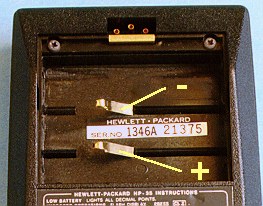 Picture of a classic battery compartment with polarity marked
(~22K)
Picture of a classic battery compartment with polarity marked
(~22K)
 Picture of a Woodstock battery pack with polarity marked
(~11K)
Picture of a Woodstock battery pack with polarity marked
(~11K)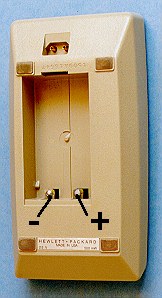 Picture of a Woodstock battery compartment with polarity marked
(~22K)
Picture of a Woodstock battery compartment with polarity marked
(~22K)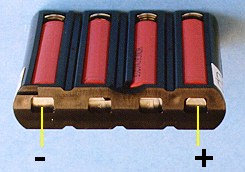 Picture of a Sting battery pack with polarity marked
(~14K)
Picture of a Sting battery pack with polarity marked
(~14K)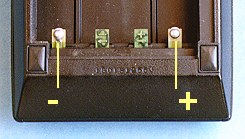 Picture of a Sting battery compartment with polarity marked
(~22K)
Picture of a Sting battery compartment with polarity marked
(~22K)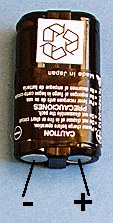 Picture of a Spice battery pack with polarity marked
(~12K)
Picture of a Spice battery pack with polarity marked
(~12K)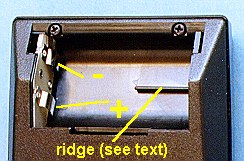 Picture of a Spice battery compartment with polarity and ridge
marked (~22K)
Picture of a Spice battery compartment with polarity and ridge
marked (~22K) 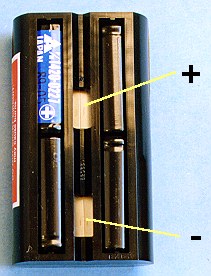 Picture of a Topcat battery pack with polarity marked
(~22K)
Picture of a Topcat battery pack with polarity marked
(~22K)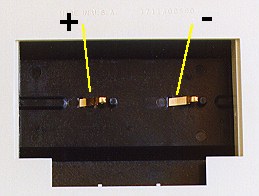 Picture of a Topcat battery compartment with polarity marked
(~22K)
Picture of a Topcat battery compartment with polarity marked
(~22K)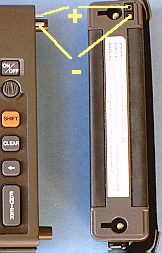 Picture of a 94 computer and battery pack with polarity marked
(~15K)
Picture of a 94 computer and battery pack with polarity marked
(~15K)